
The Problem
Every project is scattered across different tools, apps, files, and chats.

Everything is scattered
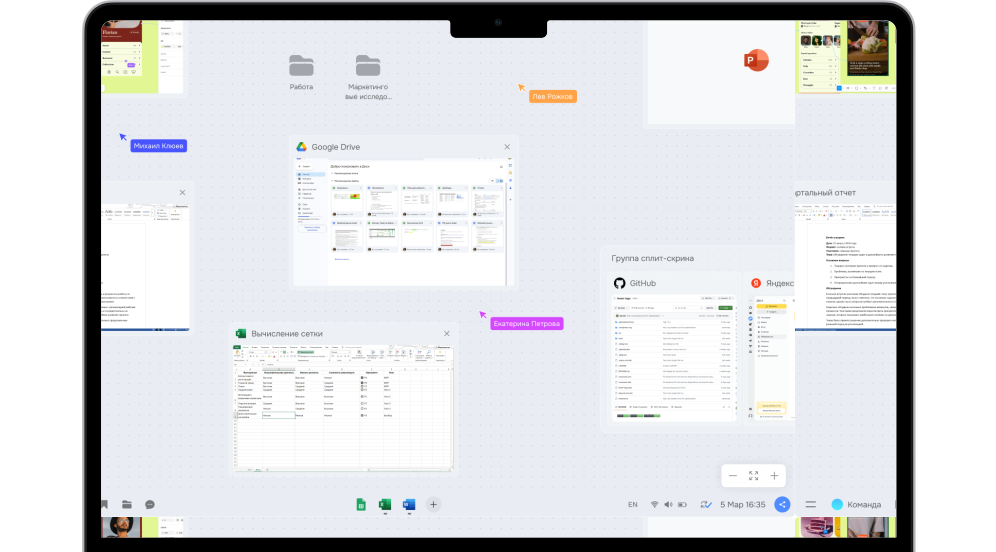
Project materials are spread across apps, folders, tabs, and chats.
Contexts get mixed up
You switch to another task, but the previous one is still on your screen.
You start from scratch
After a break, you have to find everything again and remember where you left off.

About Logarithmica
How Logarithmica works
Create a context for a project, client, role, or any other area of work. Add the windows, files, services, notes, and conversations you need. Arrange everything your way.

Separate work contexts
Keep projects and work areas separate, each with its own materials.
Infinite canvas
Arrange and resize windows and materials to suit your workflow.
Work with windows
Use web apps and files directly within each context.
File browser
Add the files and folders you need to a context, so you never have to search for them again.
Chat aggregator
Keep relevant conversations together within each work context.
Benefits
Your tools stay the same. The way you work changes.
Logarithmica doesn’t replace the tools you already use. It brings everything related to a project together in one shared context.

Your familiar tools stay
Keep using the apps and services you already know.

Everything in one project context
Keep a project’s windows, files, services, and conversations side by side.

Your workspace stays intact
Switch between projects and pick up where you left off, without searching all over again.
FAQ
Frequently Asked Questions
What is a work context?
It’s a dedicated space for a project, client, role, or any other area of work. Bring together the windows, files, services, notes, and conversations you need.
Will Logarithmica replace the apps I already use?
No. You can keep using your familiar apps, services, and files. Logarithmica helps you organize them around the work you’re doing.
How is Logarithmica different from other tools?
Most tools handle individual parts of your workflow, such as files, communication, or workspaces. Logarithmica brings these pieces together around a specific project and preserves its working context.
Which operating systems does Logarithmica support?
Logarithmica is currently available for Windows 10 and 11, and macOS Sonoma and later. Linux support is planned for 2027.
How much does Logarithmica cost?
While Logarithmica is in open beta, it’s completely free for individual users. Pricing for business customers is determined on a case-by-case basis.
How is my data stored?
All data is stored locally on your computer, and we don’t have access to it. When syncing is enabled, files are transferred in encrypted form.
Choose your operating system
The Logarithmica beta is available for Windows 10 (version 2004, build 19041 or later), Windows 11, and macOS (Sonoma or later).
Support for Intel-based Macs and Linux is coming soon.
By downloading Logarithmica, you agree to the following documents: User and License Agreement and Technical Diagnostics Consent.
